
Automate safely: nothing changes without approval
Pausing a capacity at night or scaling it down at weekends saves real money, but nobody wants a tool that changes production on its own. DataSightFort makes changes only after a second person approves them, checks them against the customer's own limits, runs them as a dry run first, and records every step in a log that can't be quietly edited.
How it works
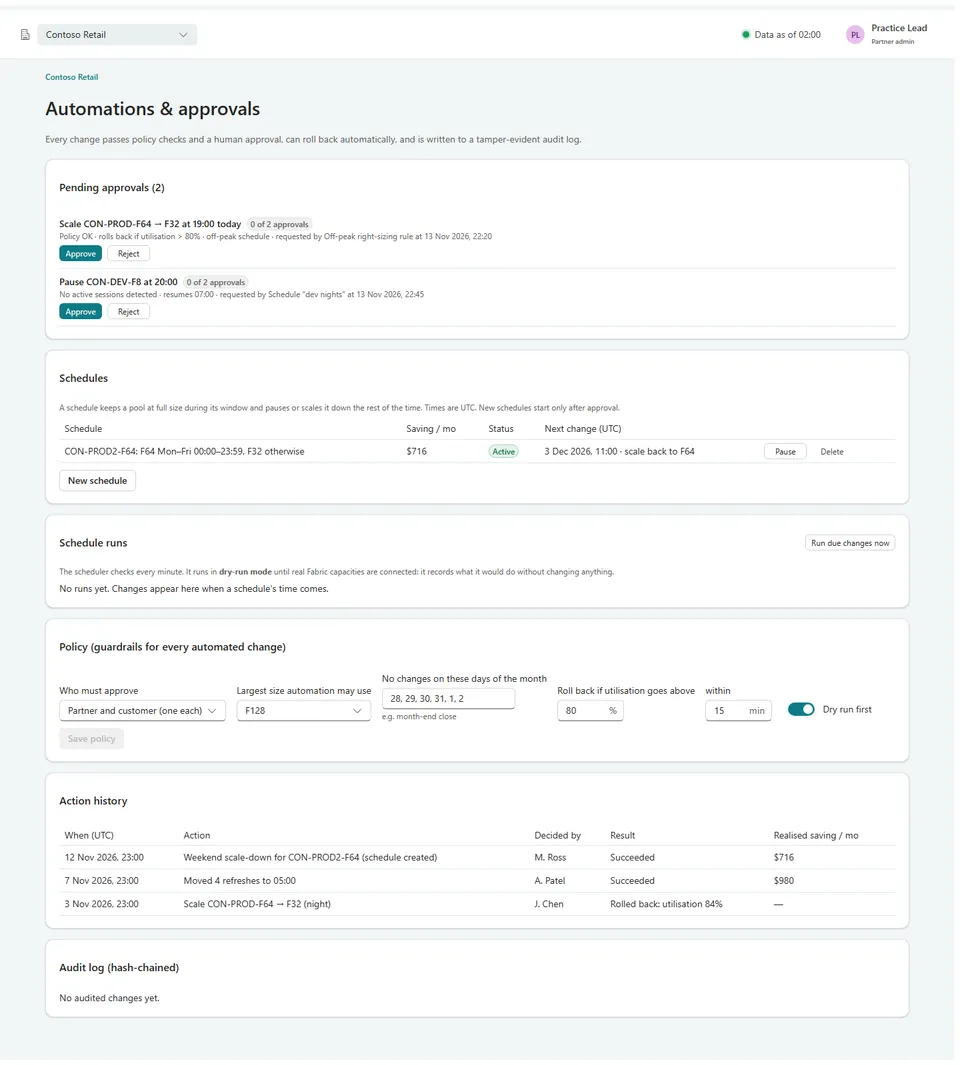
Schedules
- A schedule sets the days and hours a capacity runs at full size. Outside them, it's paused or scaled down.
- Every run records the saving it actually achieved.
Customer policy limits
- a maximum size that no change can exceed;
- blackout days when nothing changes (month-end close, for example);
- a utilisation limit that rolls a scale-down back automatically if usage climbs;
- dry-run mode, to see what would happen without changing anything.
Approvals with the four-eyes rule
- The person who requests a change can't approve it. They can reject it.
- An optional stricter mode needs one partner approval and one customer approval; the screen shows progress ("1 of 2 approvals"). Any rejection stops the change.
- Approved changes run as a dry run first, refuse anything over the maximum size or on a blackout day, and are marked failed if not picked up in time.
- Approval requests can arrive as cards in Microsoft Teams, in Slack or by email; the decision is made in DataSightFort.
Tamper-evident audit log
- Every change, approval, sign-off and download is logged in the same database transaction as the change itself.
- Entries are chained with a keyed hash, so an edited entry shows up.
- The database refuses edits or deletes of the log, even from the app itself.
- Entries are kept for at least a year.
What it can change. For Microsoft Fabric: pause, resume and change size. As other platforms arrive, their equivalent actions will follow the same approval rules (for example, pausing an Azure Synapse dedicated SQL pool or suspending a Snowflake warehouse).
Who it's for
- Approvers: a clear request with the saving, the limits and the rollback rule, and the confidence that nobody can approve their own change.
- Platform admins: schedules that run themselves within agreed limits.
- Partners and MSPs: changes in a client's tenant that the client can co-approve, with an audit trail to show at any review.
- Security reviewers: a complete, tamper-evident record of who did what and when.
Frequently asked questions
Can DataSightFort change a capacity without anyone approving it?
No. Every change needs approval from someone other than the person who requested it.
Can the client approve changes as well as the partner?
Yes. The optional stricter mode needs one partner approval and one customer approval, and any rejection stops the change.
What happens if usage climbs after a scale-down?
If the policy has a utilisation limit, the scale-down is rolled back automatically, and an alert is sent.
Can I approve from Microsoft Teams?
Approval requests arrive in Teams as cards and open in DataSightFort, where you approve or reject. One-click approval inside Teams is planned, not available yet.
How do I prove a log entry hasn't been changed?
Entries are chained with a keyed hash, so an edit breaks the chain and shows up. The client savings report re-checks its audit section for the same reason.
Is anything ever deleted automatically?
No. DataSightFort pauses, resumes and resizes compute after approval. It never deletes items.
See it on sample data.
We're looking for a small group of Microsoft partners and MSPs to shape DataSightFort before launch.