
Warnings before you overspend, not after
A budget is only useful if it warns you while there's still time to act. DataSightFort forecasts each budget to month end every day, flags it as at risk early, and sends alerts for overspend, sudden spend spikes, throttling and failed automations to the place your team already works: email, Microsoft Teams or Slack.
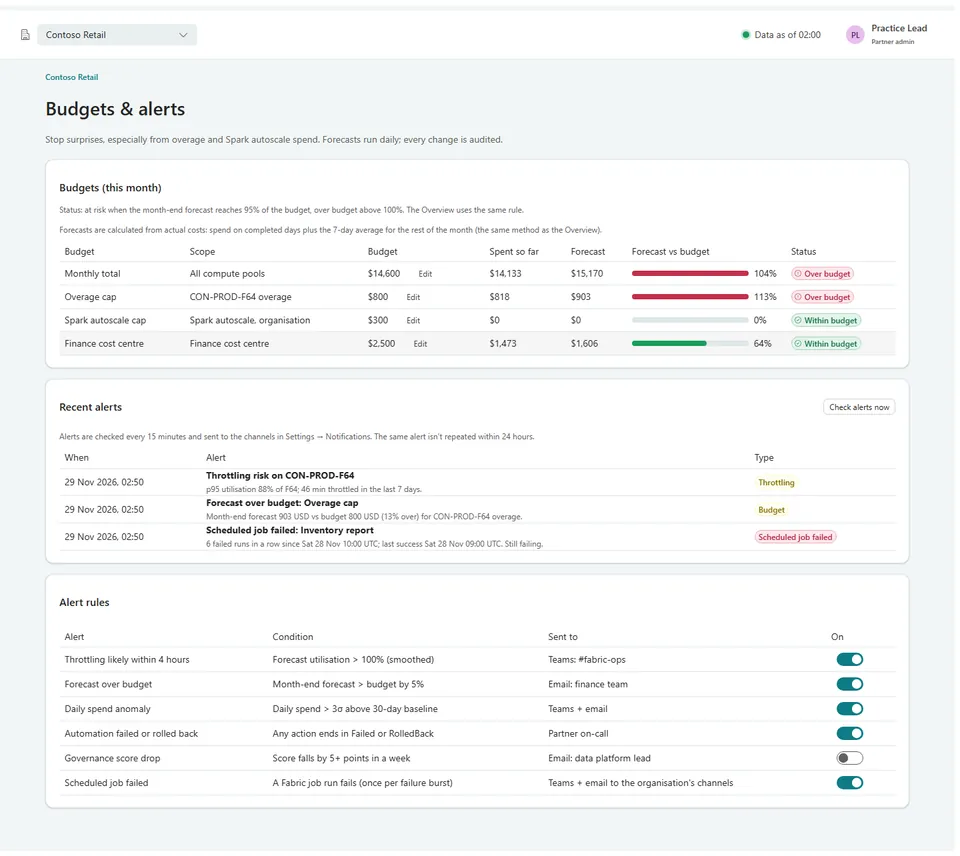
How it works
Budgets
- Scope: a budget can cover the whole organisation, one compute pool or one cost centre. It can also be limited to one kind of charge, such as overage or autoscale, so new billing models get their own guardrail.
- Forecast: spend so far, plus the average of the last 7 days for each day left in the month. It's the same forecast used on the Overview, so the figures always agree.
- Status: "At risk" when the forecast reaches 95% of the budget, and "Over" above 100%.
- Easy to adjust: budget amounts can be edited on screen.
Alerts
Alerts are checked every 15 minutes. Each alert has a cool-down, so the same problem doesn't fill your inbox. The alert kinds are:
- Budget forecast over: the forecast is more than 5% over budget.
- Spend anomaly: a day's spend is more than 3 standard deviations above normal, once there are at least 8 days of history.
- Automation failed or rolled back.
- Governance score dropped by 5 points or more (off by default).
- Capacity is throttling (Microsoft Fabric): once per episode, and again if it gets worse.
- Scheduled job failed (Microsoft Fabric): once per burst of failures, not on every failure.
Item owners can also be told when their item caused throttling, so the right person hears about it first.
Where alerts go
- Microsoft Teams: Adaptive Cards posted to a channel through a Teams Workflows webhook.
- Slack and email are also supported.
- Webhook addresses are stored securely and never shown again after they're saved.
Who it's for
- Finance and FinOps: an early warning, with a forecast you can trust because it matches every other screen.
- Platform admins: throttling, failed jobs and failed automations in the team channel, without alert storms.
- Partners and MSPs: every client's budget status on the portfolio, with "forecast over budget" in the "needs attention" list.
Frequently asked questions
How is the month-end forecast worked out?
Spend so far plus the 7-day daily average for each remaining day. It's simple on purpose, so anyone can check it.
Can I set a budget just for overage or Spark autoscale?
Yes. A budget can be limited to one kind of charge, which suits the newer Fabric billing models. See Blog: overage and Spark autoscale.
Will I get the same alert over and over?
No. Each alert has a cool-down. Throttling alerts fire once per episode, and again only if it gets worse.
What counts as a spend anomaly?
A day more than 3 standard deviations above normal spend, once there are at least 8 days of history to compare with.
Do alerts work in Microsoft Teams?
Yes. Alerts arrive as Adaptive Cards in a Teams channel. A weekly summary in Teams is planned, not available yet.
See it on sample data.
We're looking for a small group of Microsoft partners and MSPs to shape DataSightFort before launch.