
One governance score, with the evidence and the fix
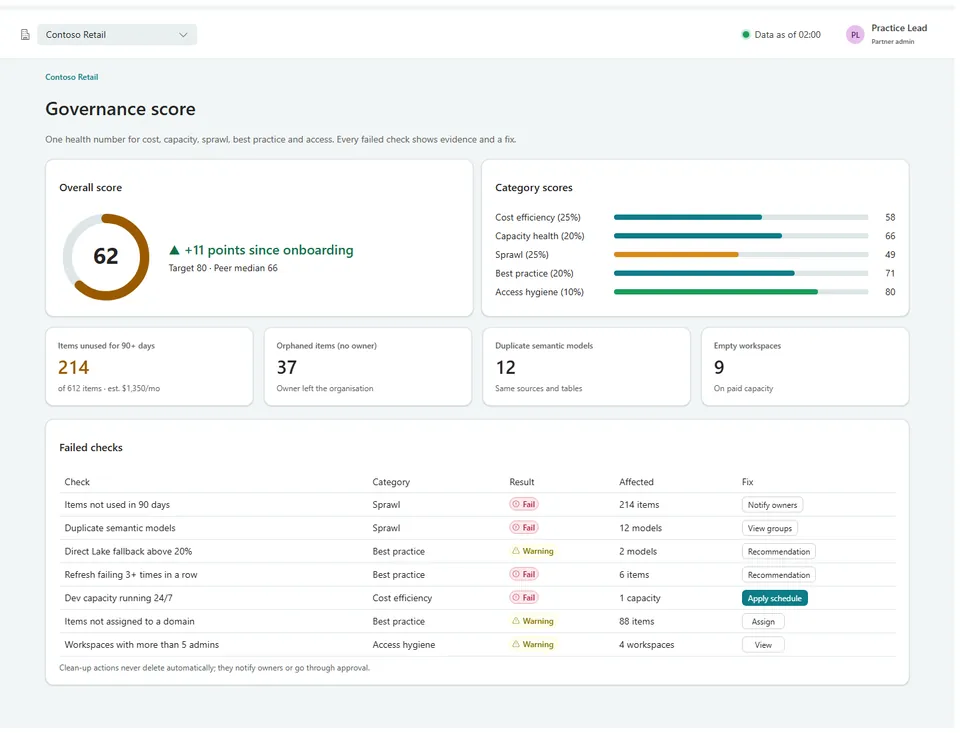
"Is this tenant in good shape?" is hard to answer with a list of 40 settings. DataSightFort gives each client one health number from 0 to 100, built from checks across cost, capacity, sprawl, best practice and access. Every failed check shows its evidence and the fix, so the score is a to-do list, not a grade.
How it works
Five categories, with default weights
- Cost efficiency (25%)
- Capacity health (20%)
- Sprawl (25%)
- Best practice (20%)
- Access hygiene (10%)
Each check scores Pass (100), Warning (50) or Fail (0). Customers can change the weights and turn checks off to match their own standards.
The checks for Microsoft Fabric
- Dev capacity running 24/7
- Idle capacity over 25%
- Steady capacities without a reservation
- Throttling in the last 7 days
- Surge protection not set
- Items unused for 90 days
- Items with no owner
- Duplicate semantic models
- Empty workspaces on paid capacity
- Direct Lake fallback over 20%
- Refresh failing 3 or more times in a row
- Items not in a domain
- Workspaces with more than 5 admins
- Access given to individuals instead of groups
Shown alongside the score
- the change since the client was onboarded;
- the peer median (from sample peers today; see Benchmarks).
Clean-up is always safe
DataSightFort never deletes anything automatically. Fixing a finding means notifying the owner or proposing a change that goes through approval.
How partners use it
At onboarding, the score gives a baseline for a new client, and each category shows where the first fixes are. At every monthly review, the change since onboarding shows progress in one number, and the failed checks become the agenda for next month. Because each check links to its evidence, a client can see exactly why a point was lost, which keeps the score from feeling like an opinion.
The same categories on every platform
As Azure Synapse, Databricks and Snowflake arrive, their findings (such as a pool that's never paused, or auto-suspend turned off) will feed the same five categories, so a client's score means the same thing across their whole data estate.
Who it's for
- Platform admins: a prioritised list of hygiene fixes with the evidence attached.
- Partners and MSPs: one number per client for every business review, and its trend since onboarding.
- Security and governance leads: access hygiene checks such as too many workspace admins or access granted to individuals.
Frequently asked questions
What does the score measure?
How well a tenant is run across cost efficiency, capacity health, sprawl, best practice and access hygiene, weighted into one number from 0 to 100.
Can we change the weights?
Yes. Customers can change the category weights and turn individual checks off.
Does a low score mean we're doing something wrong?
It means there are fixes available. Each failed check shows its evidence and the fix, and the category scores show where to start.
Will DataSightFort delete unused items?
No. It never deletes anything automatically. It notifies owners or proposes a change for approval.
Which checks run on a real tenant today?
Six: throttling, peak use, unused items, ownerless items, empty workspaces and items without a domain. The rest are planned.
See it on sample data.
We're looking for a small group of Microsoft partners and MSPs to shape DataSightFort before launch.