
Deep Microsoft Fabric support: throttling, overage and costs in money
Microsoft Fabric is DataSightFort's first and deepest platform, including Power BI capacities. Fabric's own tools show capacity units and percentages, keep about 14 days of history, and look at one capacity at a time. DataSightFort adds what partners and finance teams ask for next: costs in money from the Azure bill, throttling explained with its causes and cost, the 2026 billing models in view, and every client's capacities in one console.
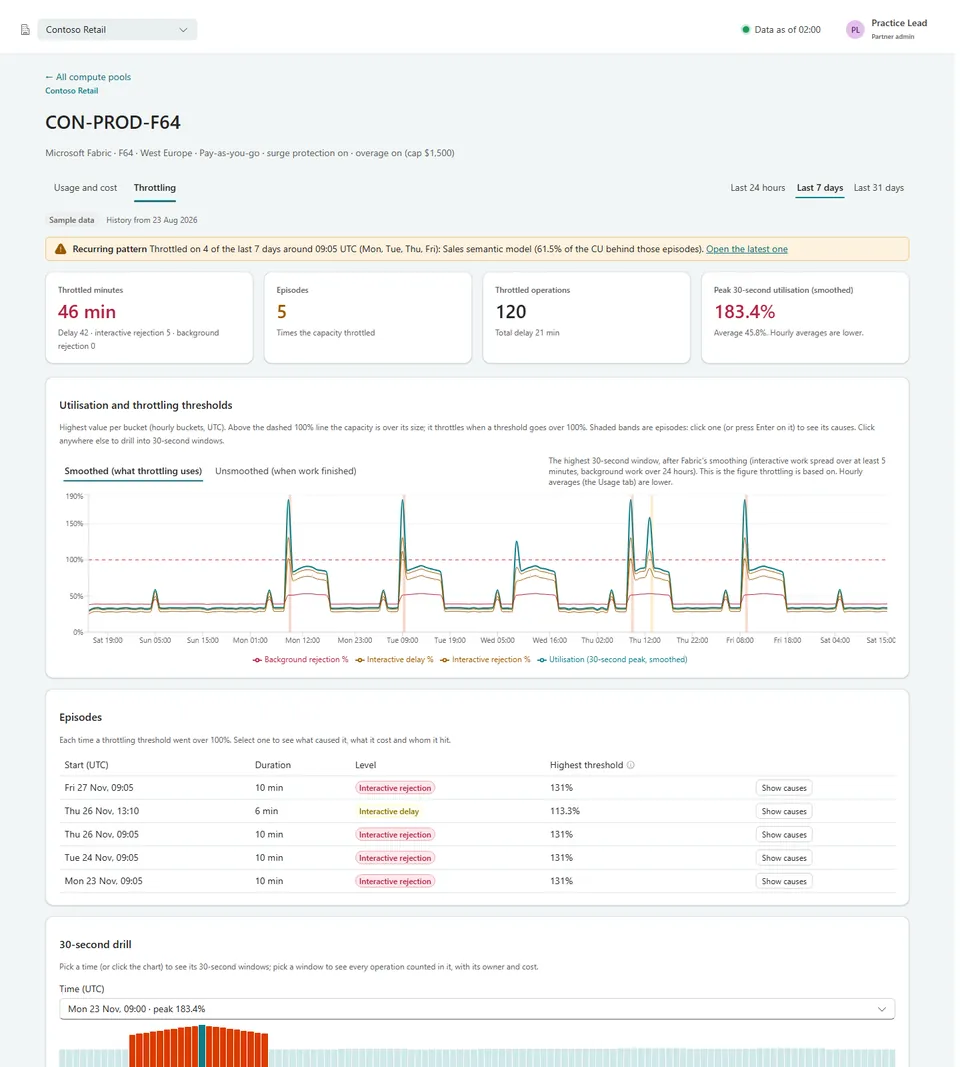
Throttling explained, not just shown
DataSightFort streams Fabric's capacity events, the same data Fabric uses for throttling decisions, covering every 30-second window and every operation. Each throttling episode shows its level (interactive delay, interactive rejection or background rejection), the items, workspaces, users and owners that caused it, how many people were affected and what it cost. Drill into any 30-second window, switch between smoothed and unsmoothed views, see the carry-forward burn-down, and spot recurring patterns. A 7-day health strip shows every capacity at once.
Costs in money, from the Azure bill
DataSightFort reads each capacity's cost from Azure Cost Management with a read-only role: actual cost, and amortised cost where a reservation applies. Every bill line is sorted into used capacity, idle capacity, overage, Spark autoscale and storage. Used capacity is split across workspaces and items by their measured use, and idle capacity stays visible as its own line. The split adds up to the bill to the cent.
Ready for capacity overage and Spark autoscale billing
Capacity overage bills excess use instead of throttling it, at about 3 times the pay-as-you-go rate. Spark autoscale billing runs Spark jobs outside the capacity and bills them separately. Both are useful, and both create costs that are easy to miss. DataSightFort shows overage and autoscale as their own lines, tracks them against a cap on the Overview, lets you set budgets just for them, and prices every throttling episode as it would cost if billed as overage.
Recommendations and safe actions
Fabric-specific rules suggest pausing idle capacity on a schedule, right-sizing off-peak, scaling up for (or moving jobs out of) a recurring throttling window, and optimising a dominant item. Pause, resume and resize happen only after a second person approves.
/features/recommendations → · /features/automation-approvals →
Item runs and failed jobs
Thirty days of run history for pipelines, notebooks and refreshes: pass rate, schedule frequency, typical duration and throttled runs, with a "scheduled job failed" alert that fires once per burst.
Governance checks for Fabric
Fourteen checks across cost, capacity, sprawl, best practice and access, such as dev capacity running 24/7, surge protection not set, items with no owner and Direct Lake fallback.
What connecting needs
The client's admin signs in with Microsoft and grants read-only consent, turns on one Fabric admin API setting (the wizard checks it), picks the capacities, and gives the Reader and Cost Management Reader roles on the Azure subscription for costs. No agent is installed. See How it works.
See it on sample data.
We're looking for a small group of Microsoft partners and MSPs to shape DataSightFort before launch.